 易网时代-编程资源站
易网时代-编程资源站
易网时代-编程资源站 AppURL是要自己填写的)。

然后分别下载相关的SDK.
http://wiki.open.t.qq.com/index.PHP/SDK%E4%B8%8B%E8%BD%BD#iOS_SDK
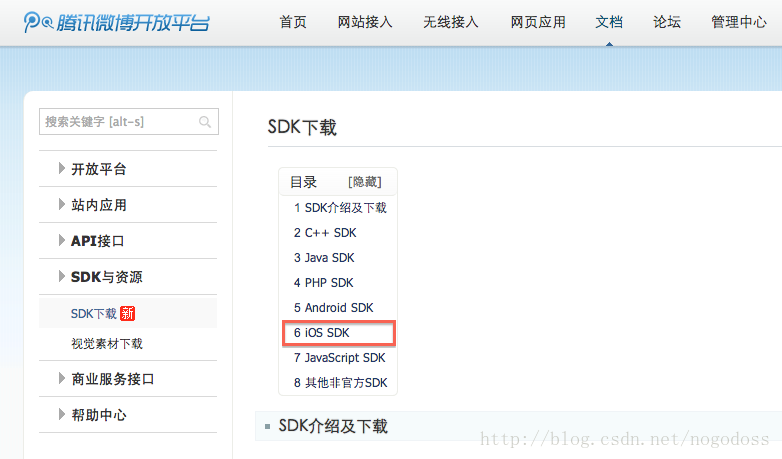
http://open.weibo.com/wiki/SDK

呵呵,上面这些都是些预备工作。下面正式开发。
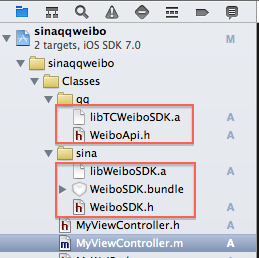
建立一个工程,取名sinaqqbo,加入相关sdk文件。 总共5个文件:sina:libWeiboSDK.a,WeiboSDK.bundle 和WeiboSDK.h qq:libTCWeiboSDK.a WeiboApi.h
然后设置Info.plist文件的URL types键值,这个的作用是新浪客户端或腾讯客户端能回调到我们的程序来。他们通过一个bundle id 和这里设置的URL Schemes键值就会相应我们app的AppDelete中的 (BOOL)application:(UIApplication *)application openURL:(NSURL *)url sourceApplication:(NSString *)sourceApplication annotation:(id)annotation委托 函数。
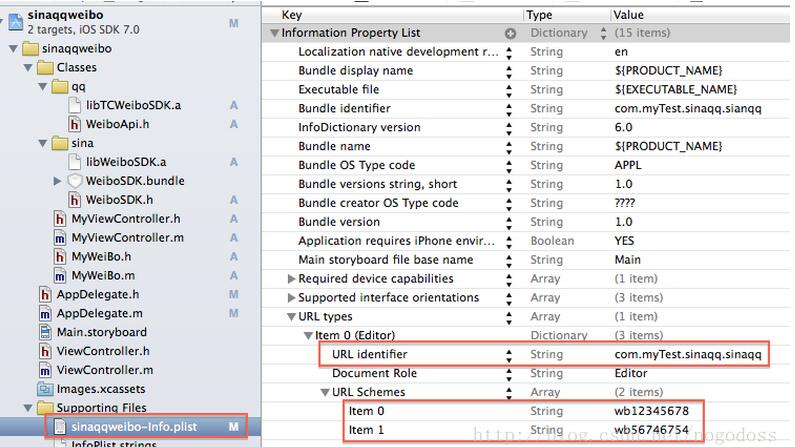
URL Schemes 的键值为 wb + AppKey。 腾讯和新浪两个就要建立两个数值。
以上就是工程上设置。
下面具体代码
// AppDelegate.h#import "WeiboSDK.h"#import "WeiboApi.h"@interface AppDelegate : UIResponder <UIApplicationDelegate,WeiboSDKDelegate,WBHttpRequestDelegate> { BOOL bSinaWB; NSString *sinaAccessToken;}@property (strong,nonatomic) WeiboApi *qqwbAppDelete; //对腾讯微博的处理。做一个全局的变量//////////////////////////////////////////// AppDelegate.m#define sinaAppKey @"yyyyyyyy"#define sinaAppSecret @"yyyyyyyyyyyyyyyyyyyyyyyyyy"#define sinaAppURL @"https://api.weibo.com/oauth2/default.html"#define qqAppKey@"xxxxxx"#define qqAppSecret @"xxxxxxxxxxxxxxxxxxxxxxxxx"#define qqAppURL@"https://api.weibo.com/oauth2/default.html"- (BOOL)application:(UIApplication *)application didFinishLaunchingWithOptions:(NSDictionary *)launchOptions{ [WeiboSDK enableDebugMode:YES]; [WeiboSDK registerApp:sinaAppKey];}//新浪,腾讯客户端调用接口- (BOOL)application:(UIApplication *)application openURL:(NSURL *)url sourceApplication:(NSString*)sourceApplication annotation:(id)annotation{ if (bSinaWB) {return [WeiboSDKhandleOpenURL:url delegate:self]; } else {return [_qqwbAppDeletehandleOpenURL:url]; } }- (BOOL)application:(UIApplication *)application handleOpenURL:(NSURL *)url{ if (bSinaWB) {return [WeiboSDKhandleOpenURL:url delegate:self]; } else {return [_qqwbAppDeletehandleOpenURL:url] ; }}以下处理sina的相关- (void)didReceiveWeiboRequest:(WBBaseRequest *)request{}- (void)didReceiveWeiboResponse:(WBBaseResponse *)response { if ([responseisKindOfClass:WBSendMessageToWeiboResponse.class]) {switch (response.statusCode) { caseWeiboSDKResponseStatusCodeSuccess: {//成功 }break;} } elseif ([response isKindOfClass:WBAuthorizeResponse.class]) {if (0 == response.statusCode) { //授权成功}else { //授权失败} }}- (void)recvNotificationData:(NSNotification *)notification { NSString *sName = notification.name; if ([sName isEqualToString:@"Auth"]) {//sina 的授权请求--》新浪微博客户端和网页版通用的命令/* 新浪微博客户端,就是sso,通过新浪微博客户端授权和发布微博内容 网页版,就是组合命令直接发送到新浪微博服务端。 */WBAuthorizeRequest *request = [WBAuthorizeRequestrequest];request.redirectURI = sinaAppURL;request.scope = @"all";[WeiboSDK sendRequest:request]; } else if ([sNameisEqualToString:@"Data"]) {if ([WeiboSDKisWeiboAppInstalled]){ //安装了新浪微博客户端 WBMessageObject *message = [WBMessageObjectmessage]; message.text = @"文本"; WBImageObject *image = [WBImageObjectobject]; image.imageData = @"图片";//jpeg格式的图片,为NSData形式 message.imageObject = image; WBSendMessageToWeiboRequest *request = [WBSendMessageToWeiboRequestrequestWithMessage:message]; [WeiboSDK sendRequest:request];}else { BOOL bText = YES; if (bText) {NSMutableDictionary* parameters = [NSMutableDictionarydictionary];[parameters setObject:@"文本"forKey:@"status"];[WBHttpRequestrequestWithAccessToken:sinaAccessTokenurl:[NSStringstringWithFormat:@"%@",@"https://api.weibo.com/2/statuses/update.json"]httpMethod:@"POST"params:parametersdelegate:selfwithTag:@"1"]; } else {NSMutableDictionary* parameters = [NSMutableDictionarydictionary];[parameters setObject:@"文本"forKey:@"status"];[parameters setObject:@"图片"forKey:@"pic"]; //jpeg的 NSData 格式,[WBHttpRequestrequestWithAccessToken:sinaAccessTokenurl:[NSStringstringWithFormat:@"%@",@"https://api.weibo.com/2/statuses/upload.json"]httpMethod:@"POST"params:parametersdelegate:selfwithTag:[NSStringstringWithFormat:@"1"]]; }} } else if ([sNameisEqualToString:@"LogOut"]) {[WeiboSDK logOutWithToken:sinaAccessTokendelegate:selfwithTag:@"1"]; }}#pragma Mark WBHttpRequestDelegate- (void)request:(WBHttpRequest *)request didFailWithError:(NSError *)error { //发布失败}- (void)request:(WBHttpRequest *)request didFinishLoadingWithResult:(NSString *)result { //发布成功}腾讯的实现方式和新浪的不一样。下面是腾讯的调用方式
// MyViewController.h#import "WeiboApi.h"@interface MyViewController :UIViewController<WeiboAuthDelegate,WeiboRequestDelegate> {}@property(nonatomic,retain)WeiboApi *qqwb;@end// MyViewController.m#import "AppDelegate.h"- (void)viewDidLoad{ [superviewDidLoad]; AppDelegate *delegate = (AppDelegate*)[UIApplicationsharedApplication].delegate; if (nil != delegate.qqwbAppDelete) {self.qqwb = delegate.qqwbAppDelete; } else {self.qqwb = [[WeiboApialloc]initWithAppKey:qqAppKeyandSecret:qqAppSecretandRedirectUri:qqAppURL];delegate.qqwbAppDelete = _qqwb; }}- (void)buttonAction:(id)sender { UIButton *button = (UIButton *)sender; if (0 == button.tag) {//新浪[selfsendAuthWithType:0]; } else {//腾讯[selfsendAuthWithType:1]; }}- (void)sendAuthWithType:(NSInteger)aIndex { if (0 == aIndex) {if ([self isAuthValid]) { //显示内容界面}else { [[NSNotificationCenterdefaultCenter] postNotificationName:@"Auth"object:nil];} } else {if ([self isAuthValid]) { //显示内容界面}else { [_qqwb loginWithDelegate:selfandRootController:self];} }}- (void)sendDataWithPic:(NSString *)sText ImageData:(NSData *)aImageData { NSMutableDictionary* parameters = [NSMutableDictionarydictionary]; [parameters setObject:@"xml"forKey:@"format"]; [parameters setObject:sText forKey:@"content"]; [parameters setObject:aImageData forKey:@"pic"]; [_qqwb requestWithParams:parametersapiName:[NSStringstringWithFormat:@"%@",@"t/add_pic"] httpMethod:@"POST"delegate:self];}- (void)sendText:(NSString *)sText { NSMutableDictionary* parameters = [NSMutableDictionarydictionary]; [parameters setObject:@"xml"forKey:@"format"]; [parameters setObject:sText forKey:@"content"]; [_qqwb requestWithParams:parametersapiName:[NSStringstringWithFormat:@"%@",@"t/add"] httpMethod:@"POST"delegate:self];}#pragma Mark WeiboAuthDelegate- (void)DidAuthFinished:(WeiboApi *)wbapi { //授权成功,后显示内容界面}#pragma Mark WeiboRequestDelegate- (void)didReceiveRawData:(NSData *)data reqNo:(int)reqno { //发布成功}- (void)didFailWithError:(NSError *)error reqNo:(int)reqno { //发布失败}//以下是处理sina的授权验证函数,qq的未写。- (void)removeAuthData{ self.sinaid = nil; self.sinatoken =nil; self.sinadate =nil;}- (BOOL)isLoggedIn{ returnsinaid && sinatoken && sinadate;}- (BOOL)isAuthorizeExpired{ NSDate *now = [NSDatedate]; /*if (0 == bSina) {*/return ([nowcompare:sinadate] ==NSOrderedDescending); //} /*else {AppDelegate *delegate = (AppDelegate*)[UIApplication sharedApplication].delegate;return [delegate.qqwbAppDelete isAuthorizeExpired]; }*/}- (BOOL)isAuthValid{ return ([selfisLoggedIn] && ![selfisAuthorizeExpired]);}以下是网上资源
新浪:
http://www.jb51.net/article/98044.htm
腾讯:
https://github.com/heloyue/TCWeiboSDK-LightVersion
以上就是本文的全部内容,希望对大家的学习有所帮助,也希望大家多多支持脚本之家。