前几天app注册被人攻击了,从网上找了这个先保存下。。。。
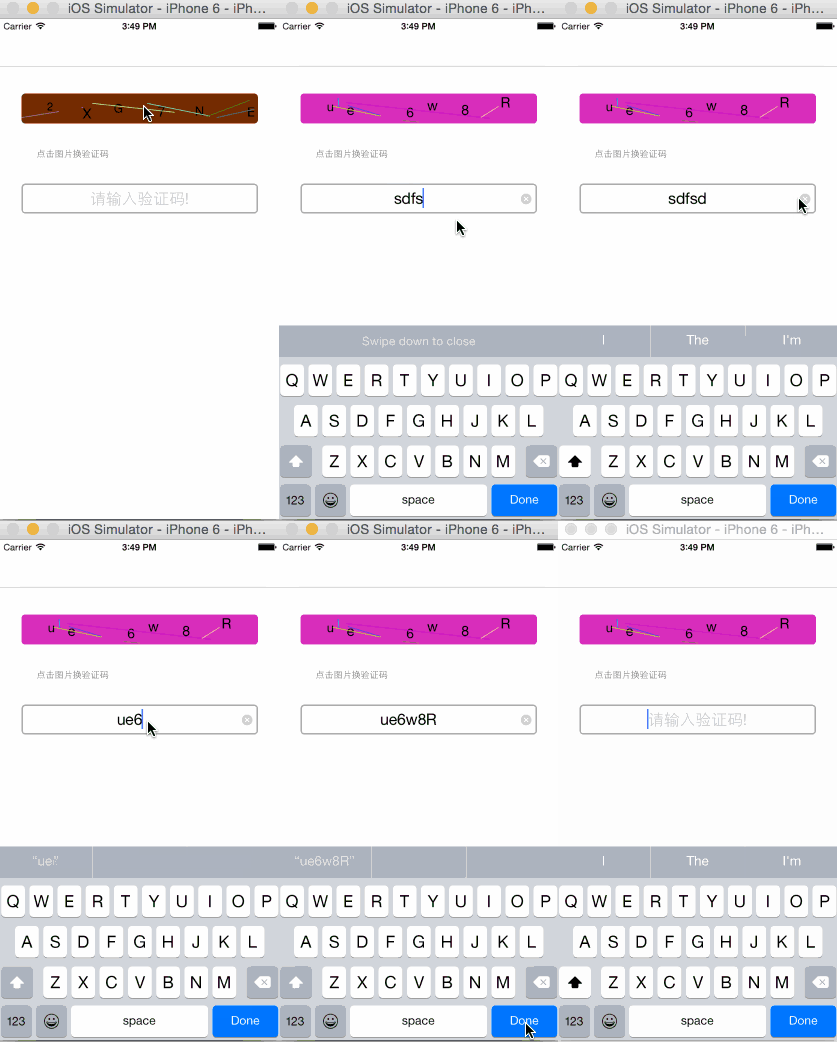
用于ios本地动态生成验证码,效果如下:
用于绘制图形
AuthcodeView.h#import <UIKit/UIKit.h>@interface AuthcodeView : UIView@property (strong, nonatomic) NSArray *dataArray;//字符素材数组@property (strong, nonatomic) NSMutableString *authCodeStr;//验证码字符串@endAuthcodeView.m#import "AuthcodeView.h"#define kRandomColor [UIColor colorWithRed:arc4random() % 256 / 256.0 green:arc4random() % 256 / 256.0 blue:arc4random() % 256 / 256.0 alpha:1.0];#define kLineCount 6#define kLineWidth 1.0#define kCharCount 6#define kFontSize [UIFont systemFontOfSize:arc4random() % 5 + 15]@implementation AuthcodeView/*// Only override drawRect: if you perform custom drawing.// An empty implementation adversely affects performance during animation.- (void)drawRect:(CGRect)rect {// Drawing code}*/- (instancetype)initWithFrame:(CGRect)frame{self = [super initWithFrame:frame];if (self){self.layer.cornerRadius = 5.0f;self.layer.masksToBounds = YES;self.backgroundColor = kRandomColor;[self getAuthcode];//获得随机验证码}return self;}#pragma mark 获得随机验证码- (void)getAuthcode{//字符串素材_dataArray = [[NSArray alloc] initWithObjects:@"0",@"1",@"2",@"3",@"4",@"5",@"6",@"7",@"8",@"9",@"A",@"B",@"C",@"D",@"E",@"F",@"G",@"H",@"I",@"J",@"K",@"L",@"M",@"N",@"O",@"P",@"Q",@"R",@"S",@"T",@"U",@"V",@"W",@"X",@"Y",@"Z",@"a",@"b",@"c",@"d",@"e",@"f",@"g",@"h",@"i",@"j",@"k",@"l",@"m",@"n",@"o",@"p",@"q",@"r",@"s",@"t",@"u",@"v",@"w",@"x",@"y",@"z",nil];_authCodeStr = [[NSMutableString alloc] initWithCapacity:kCharCount];//随机从数组中选取需要个数的字符串,拼接为验证码字符串for (int i = 0; i < kCharCount; i++){NSInteger index = arc4random() % (_dataArray.count-1);NSString *tempStr = [_dataArray objectAtIndex:index];_authCodeStr = (NSMutableString *)[_authCodeStr stringByAppendingString:tempStr];}}#pragma mark 点击界面切换验证码- (void)touchesBegan:(NSSet *)touches withEvent:(UIEvent *)event{[self getAuthcode];//setNeedsDisplay调用drawRect方法来实现view的绘制[self setNeedsDisplay];}- (void)drawRect:(CGRect)rect{[super drawRect:rect];//设置随机背景颜色self.backgroundColor = kRandomColor;//根据要显示的验证码字符串,根据长度,计算每个字符串显示的位置NSString *text = [NSString stringWithFormat:@"%@",_authCodeStr];CGSize cSize = [@"A" sizeWithAttributes:@{NSFontAttributeName:[UIFont systemFontOfSize:20]}];int width = rect.size.width/text.length - cSize.width;int height = rect.size.height - cSize.height;CGPoint point;//依次绘制每一个字符,可以设置显示的每个字符的字体大小、颜色、样式等float pX,pY;for ( int i = 0; i<text.length; i++){pX = arc4random() % width + rect.size.width/text.length * i;pY = arc4random() % height;point = CGPointMake(pX, pY);unichar c = [text characterAtIndex:i];NSString *textC = [NSString stringWithFormat:@"%C", c];[textC drawAtPoint:point withAttributes:@{NSFontAttributeName:kFontSize}];} //调用drawRect:之前,系统会向栈中压入一个CGContextRef,调用UIGraphicsGetCurrentContext()会取栈顶的CGContextRefCGContextRef context = UIGraphicsGetCurrentContext();//设置线条宽度CGContextSetLineWidth(context, kLineWidth);//绘制干扰线for (int i = 0; i < kLineCount; i++){UIColor *color = kRandomColor;CGContextSetStrokeColorWithColor(context, color.CGColor);//设置线条填充色//设置线的起点pX = arc4random() % (int)rect.size.width;pY = arc4random() % (int)rect.size.height;CGContextMoveToPoint(context, pX, pY);//设置线终点pX = arc4random() % (int)rect.size.width;pY = arc4random() % (int)rect.size.height;CGContextAddLineToPoint(context, pX, pY);//画线CGContextStrokePath(context);}}@end@interface AuthCodeViewController ()<UITextFieldDelegate, UIAlertViewDelegate>{AuthcodeView *authCodeView;UITextField *_input;}@end@implementation AuthCodeViewController- (void)viewDidLoad {[super viewDidLoad];// Do any additional setup after loading the view.self.view.backgroundColor = [UIColor whiteColor];//显示验证码界面authCodeView = [[AuthcodeView alloc] initWithFrame:CGRectMake(30, 100, self.view.frame.size.width-60, 40)];[self.view addSubview:authCodeView];//提示文字UILabel *label = [[UILabel alloc] initWithFrame:CGRectMake(50, 160, self.view.frame.size.width-100, 40)];label.text = @"点击图片换验证码";label.font = [UIFont systemFontOfSize:12];label.textColor = [UIColor grayColor];[self.view addSubview:label];//添加输入框_input = [[UITextField alloc] initWithFrame:CGRectMake(30, 220, self.view.frame.size.width-60, 40)];_input.layer.borderColor = [UIColor lightGrayColor].CGColor;_input.layer.borderWidth = 2.0;_input.layer.cornerRadius = 5.0;_input.font = [UIFont systemFontOfSize:21];_input.placeholder = @"请输入验证码!";_input.clearButtonMode = UITextFieldViewModeWhileEditing;_input.backgroundColor = [UIColor clearColor];_input.textAlignment = NSTextAlignmentCenter;_input.returnKeyType = UIReturnKeyDone;_input.delegate = self;[self.view addSubview:_input];}#pragma mark 输入框代理,点击return 按钮- (BOOL)textFieldShouldReturn:(UITextField *)textField{//判断输入的是否为验证图片中显示的验证码if ([_input.text isEqualToString:authCodeView.authCodeStr]){//正确弹出警告款提示正确UIAlertView *alview = [[UIAlertView alloc] initWithTitle:@"恭喜您 ^o^" message:@"验证成功" delegate:self cancelButtonTitle:@"OK" otherButtonTitles:nil, nil];[alview show];}else{//验证不匹配,验证码和输入框抖动CAKeyframeAnimation *anim = [CAKeyframeAnimation animationWithKeyPath:@"transform.translation.x"];anim.repeatCount = 1;anim.values = @[@-20,@20,@-20];//[authCodeView.layer addAnimation:anim forKey:nil];[_input.layer addAnimation:anim forKey:nil];}return YES;}#pragma mark 警告框中方法-(void)alertView:(UIAlertView *)alertView clickedButtonAtIndex:(NSInteger)buttonIndex{//清空输入框内容,收回键盘if (buttonIndex==0){_input.text = @"";[_input resignFirstResponder];}}以上所述是小编给大家介绍的iOS本地动态生成验证码的方法,希望对大家有所帮助,如果大家有任何疑问请给我留言,小编会及时回复大家的。在此也非常感谢大家对脚本之家网站的支持!
 易网时代-编程资源站