 易网时代-编程资源站
易网时代-编程资源站
易网时代-编程资源站 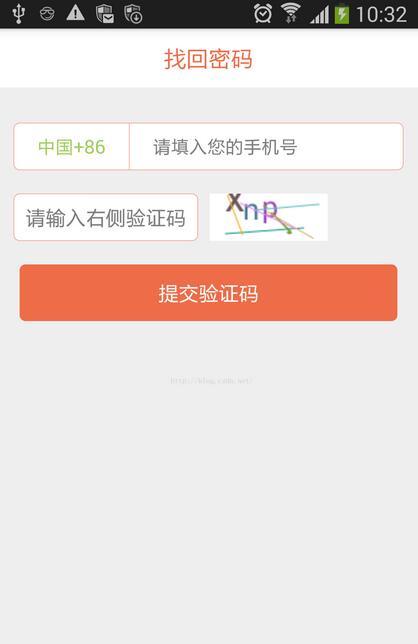
1、生成随机数代码,Code.java:
public class Code { //随机数数组private static final char[] CHARS = {"2", "3", "4", "5", "6", "7", "8", "9","a", "b", "c", "d", "e", "f", "g", "h", "j", "k", "m","n", "p", "q", "r", "s", "t", "u", "v", "w", "x", "y", "z","A", "B", "C", "D", "E", "F", "G", "H", "I", "J", "K", "L", "M","N", "P", "Q", "R", "S", "T", "U", "V", "W", "X", "Y", "Z"}; private static Code bmpCode; public static Code getInstance() { if(bmpCode == null)bmpCode = new Code(); return bmpCode;} //default settings//验证码默认随机数的个数private static final int DEFAULT_CODE_LENGTH = 4;//默认字体大小private static final int DEFAULT_FONT_SIZE = 25;//默认线条的条数private static final int DEFAULT_LINE_NUMBER = 5;//padding值private static final int BASE_PADDING_LEFT = 10, RANGE_PADDING_LEFT = 15, BASE_PADDING_TOP = 15, RANGE_PADDING_TOP = 20;//验证码的默认宽高private static final int DEFAULT_WIDTH = 100, DEFAULT_HEIGHT = 40; //settings decided by the layout xml//canvas width and heightprivate int width = DEFAULT_WIDTH, height = DEFAULT_HEIGHT; //random word space and pading_topprivate int base_padding_left = BASE_PADDING_LEFT, range_padding_left = RANGE_PADDING_LEFT,base_padding_top = BASE_PADDING_TOP, range_padding_top = RANGE_PADDING_TOP; //number of chars, lines; font sizeprivate int codeLength = DEFAULT_CODE_LENGTH, line_number = DEFAULT_LINE_NUMBER, font_size = DEFAULT_FONT_SIZE; //variablesprivate String code;private int padding_left, padding_top;private Random random = new Random();//验证码图片public Bitmap createBitmap() { padding_left = 0;Bitmap bp = Bitmap.createBitmap(width, height, Config.ARGB_8888); Canvas c = new Canvas(bp);code = createCode();c.drawColor(Color.WHITE); Paint paint = new Paint(); paint.setAntiAlias(true); paint.setTextSize(font_size); //画验证码 for (int i = 0; i < code.length(); i++) {randomTextStyle(paint);randomPadding();c.drawText(code.charAt(i) + "", padding_left, padding_top, paint); } //画线条 for (int i = 0; i < line_number; i++) {drawLine(c, paint); }c.save( Canvas.ALL_SAVE_FLAG );//保存 c.restore();// return bp;} public String getCode() { return code;} //生成验证码private String createCode() { StringBuilder buffer = new StringBuilder(); for (int i = 0; i < codeLength; i++) {buffer.append(CHARS[random.nextInt(CHARS.length)]); } return buffer.toString();}//画干扰线private void drawLine(Canvas canvas, Paint paint) { int color = randomColor(); int startX = random.nextInt(width); int startY = random.nextInt(height); int stopX = random.nextInt(width); int stopY = random.nextInt(height); paint.setStrokeWidth(1); paint.setColor(color); canvas.drawLine(startX, startY, stopX, stopY, paint);}//生成随机颜色private int randomColor() { return randomColor(1);} private int randomColor(int rate) { int red = random.nextInt(256) / rate; int green = random.nextInt(256) / rate; int blue = random.nextInt(256) / rate; return Color.rgb(red, green, blue);}//随机生成文字样式,颜色,粗细,倾斜度private void randomTextStyle(Paint paint) { int color = randomColor(); paint.setColor(color); paint.setFakeBoldText(random.nextBoolean()); //true为粗体,false为非粗体 float skewX = random.nextInt(11) / 10; skewX = random.nextBoolean() ? skewX : -skewX; paint.setTextSkewX(skewX); //float类型参数,负数表示右斜,整数左斜 //paint.setUnderlineText(true); //true为下划线,false为非下划线 //paint.setStrikeThruText(true); //true为删除线,false为非删除线}//随机生成padding值private void randomPadding() { padding_left += base_padding_left + random.nextInt(range_padding_left); padding_top = base_padding_top + random.nextInt(range_padding_top);} } 2、编写布局文件,activity_main.xml:<?xml version="1.0" encoding="utf-8"?> <LinearLayout xmlns:android="http://schemas.android.com/apk/res/android"android:layout_width="match_parent"android:layout_height="match_parent"android:orientation="vertical" > <RelativeLayout android:layout_width="match_parent" android:layout_height="50dp" android:background="@color/main_color_white" > <TextViewandroid:id="@+id/tv_title"android:layout_width="wrap_content"android:layout_height="wrap_content"android:layout_centerInParent="true"android:text="找回密码"android:textColor="@color/loan_butBackground"android:textSize="20sp" /></RelativeLayout> <LinearLayout android:layout_width="match_parent" android:layout_height="40dp" android:layout_marginTop="30dp" android:orientation="vertical" android:layout_marginLeft="15dp" android:layout_marginRight="15dp" android:background="@drawable/security_code_bg"><LinearLayoutandroid:layout_width="match_parent"android:layout_height="match_parent"android:gravity="center_vertical"android:orientation="horizontal" > <TextView android:layout_width="wrap_content" android:layout_height="wrap_content" android:layout_marginLeft="20dp" android:layout_marginRight="20dp" android:text="中国+86" android:textColor="#A2CD5A" android:textSize="16sp" /> <View android:layout_width="0.1dp" android:layout_height="match_parent" android:background="@color/loan_butBackground" /> <EditText android:id="@+id/et_forgetPass_PhoneNum" android:layout_width="match_parent" android:layout_height="wrap_content" android:layout_marginLeft="20dp" android:background="@null" android:digits="0123456789" android:hint="请填入您的手机号" android:inputType="number" android:maxLength="11" android:textSize="16sp" /> </LinearLayout></LinearLayout><LinearLayoutandroid:layout_width="match_parent" android:layout_height="wrap_content" android:layout_marginLeft="15dp" android:layout_marginRight="15dp" android:layout_marginTop="20dp" android:orientation="horizontal" ><LinearLayoutandroid:layout_width="wrap_content"android:layout_height="40dp"android:background="@drawable/security_code_bg" > <EditText android:id="@+id/et_phoneCodes" android:layout_width="match_parent" android:layout_height="match_parent" android:layout_marginLeft="10dp" android:layout_marginRight="10dp" android:background="@null" android:hint="请输入右侧验证码" /> </LinearLayout><ImageViewandroid:id="@+id/iv_showCode"android:layout_width="100dp"android:layout_marginLeft="10dp"android:layout_height="match_parent" /> </LinearLayout> <Button android:id="@+id/but_forgetpass_toSetCodes" android:layout_width="match_parent" android:layout_height="wrap_content" android:layout_margin="20dp" android:background="@drawable/buttonshape" android:text="提交验证码" android:textColor="@color/main_color_white" /></LinearLayout>3、在主界面生成随机数,校验验证码MainActivity.java:
public class MainActivity extends Activity implements OnClickListener {public static final String TAG = MainActivity.class.getName();private ImageView iv_showCode;private EditText et_phoneCode;private EditText et_phoneNum;//产生的验证码private String realCode; @Overrideprotected void onCreate(Bundle savedInstanceState) { super.onCreate(savedInstanceState); setContentView(R.layout.activity_main);et_phoneCode = (EditText) findViewById(R.id.et_phoneCodes); Button but_toSetCode = (Button) findViewById(R.id.but_forgetpass_toSetCodes); but_toSetCode.setOnClickListener(this); iv_showCode = (ImageView) findViewById(R.id.iv_showCode); //将验证码用图片的形式显示出来 iv_showCode.setImageBitmap(Code.getInstance().createBitmap()); realCode = Code.getInstance().getCode().toLowerCase(); iv_showCode.setOnClickListener(this);} @Overridepublic void onClick(View v) { switch (v.getId()) {case R.id.iv_showCode: iv_showCode.setImageBitmap(Code.getInstance().createBitmap()); realCode = Code.getInstance().getCode().toLowerCase(); Log.v(TAG,"realCode"+realCode); break;case R.id.but_forgetpass_toSetCodes: String phoneCode = et_phoneCode.getText().toString().toLowerCase(); String msg = "生成的验证码:"+realCode+"输入的验证码:"+phoneCode; Toast.makeText(MainActivity.this,msg,Toast.LENGTH_LONG).show();if (phoneCode.equals(realCode)) {Toast.makeText(MainActivity.this, phoneCode + "验证码正确", Toast.LENGTH_SHORT).show(); } else {Toast.makeText(MainActivity.this, phoneCode + "验证码错误", Toast.LENGTH_SHORT).show(); } break; }} } 至此,基本功能已实现,源码下载:http://xiazai.jb51.net/201611/yuanma/AndroidSecurityCode(jb51.net).rar