 易网时代-编程资源站
易网时代-编程资源站
易网时代-编程资源站 
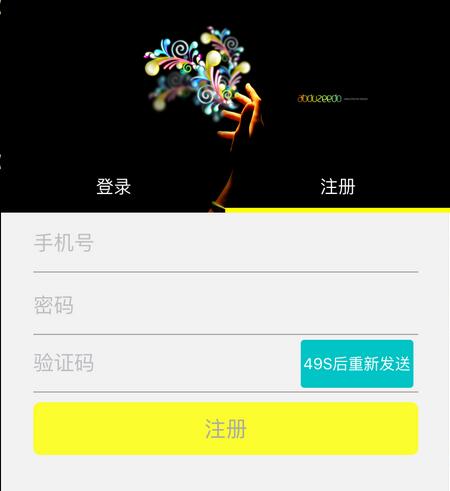
具体代码:
定义一个发送验证码的按钮,添加点击事件
//发送验证码按钮_sentCodeBtn = [[UIButton alloc] initWithFrame:CGRectMake(kScreenWidth - 27 - 4 - 94, CGRectGetMinY(_registerCodeFD.frame) + 4, 94, 40)];[_sentCodeBtn setBackgroundColor:colorWithRGBA(0, 191, 191, 0.9)];[_sentCodeBtn setTitle:@"发送验证码" forState:UIControlStateNormal];[_sentCodeBtn.titleLabel setFont:[UIFont systemFontOfSize:13.0f]];//设置圆角[_sentCodeBtn.layer setCornerRadius:3.0f];[_sentCodeBtn.layer setShouldRasterize:YES];[_sentCodeBtn.layer setRasterizationScale:[UIScreen mainScreen].scale];//发送事件[_sentCodeBtn addTarget:self action:@selector(sentCodeMethod) forControlEvents:UIControlEventTouchUpInside];[self.view addSubview:_sentCodeBtn];
监听事件:
//发送验证码-(void)sentCodeMethod{ NSLog(@"发送验证码。。"); //计时器发送验证码 [self sentPhoneCodeTimeMethod]; //调用发送验证码接口-》}//计时器发送验证码-(void)sentPhoneCodeTimeMethod{ //倒计时时间 - 60秒 __block NSInteger timeOut = 59; //执行队列 dispatch_queue_t queue = dispatch_get_global_queue(DISPATCH_QUEUE_PRIORITY_DEFAULT, 0); //计时器 -》dispatch_source_set_timer自动生成 dispatch_source_t timer = dispatch_source_create(DISPATCH_SOURCE_TYPE_TIMER, 0, 0, queue); dispatch_source_set_timer(timer, DISPATCH_TIME_NOW, 1.0 * NSEC_PER_SEC, 0 * NSEC_PER_SEC); dispatch_source_set_event_handler(timer, ^{if (timeOut <= 0) { dispatch_source_cancel(timer); //主线程设置按钮样式-》 dispatch_async(dispatch_get_main_queue(), ^{[_sentCodeBtn setTitle:@"发送验证码" forState:UIControlStateNormal];[_sentCodeBtn setUserInteractionEnabled:YES]; });}else{ //开始计时 //剩余秒数 seconds NSInteger seconds = timeOut % 60; NSString *strTime = [NSString stringWithFormat:@"%.1ld",seconds]; //主线程设置按钮样式 dispatch_async(dispatch_get_main_queue(), ^{[UIView beginAnimations:nil context:nil];[UIView setAnimationDuration:1.0];[_sentCodeBtn setTitle:[NSString stringWithFormat:@"%@S后重新发送",strTime] forState:UIControlStateNormal];[UIView commitAnimations];//计时器件不允许点击[_sentCodeBtn setUserInteractionEnabled:NO]; }); timeOut--;} }); dispatch_resume(timer);}以上就是本文的全部内容,希望对大家的学习有所帮助。